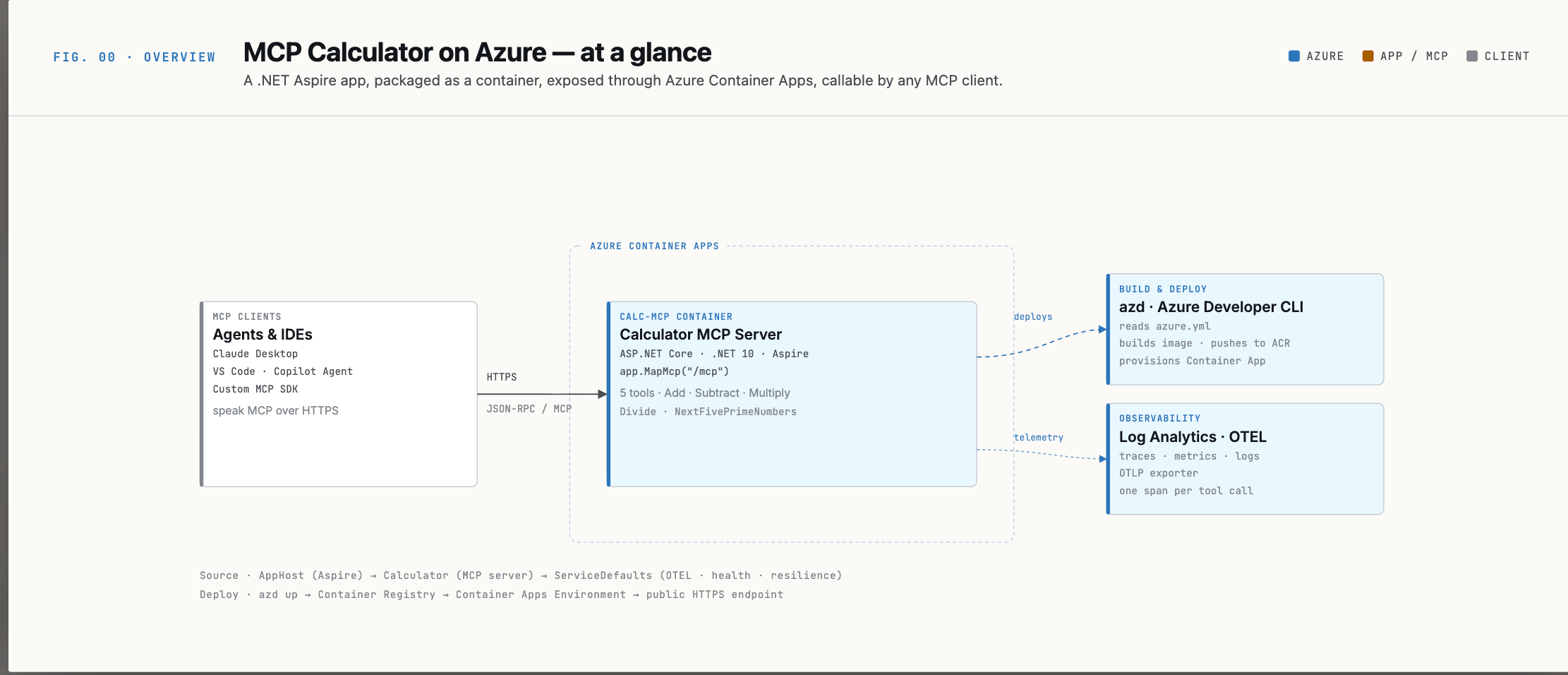
The Model Context Protocol (MCP) is quickly becoming the standard way to give AI models access to your tools and data. Think of it as a USB-C port for AI — a universal interface that lets any compatible LLM (Claude, GPT-4, Gemini) call your backend functions in a structured, safe, and consistent way.
But most tutorials stop at “run it locally.” This article shows you the full picture: build an MCP server in .NET, orchestrate it with .NET Aspire, and deploy it to Azure Container Apps — production-ready from the start.
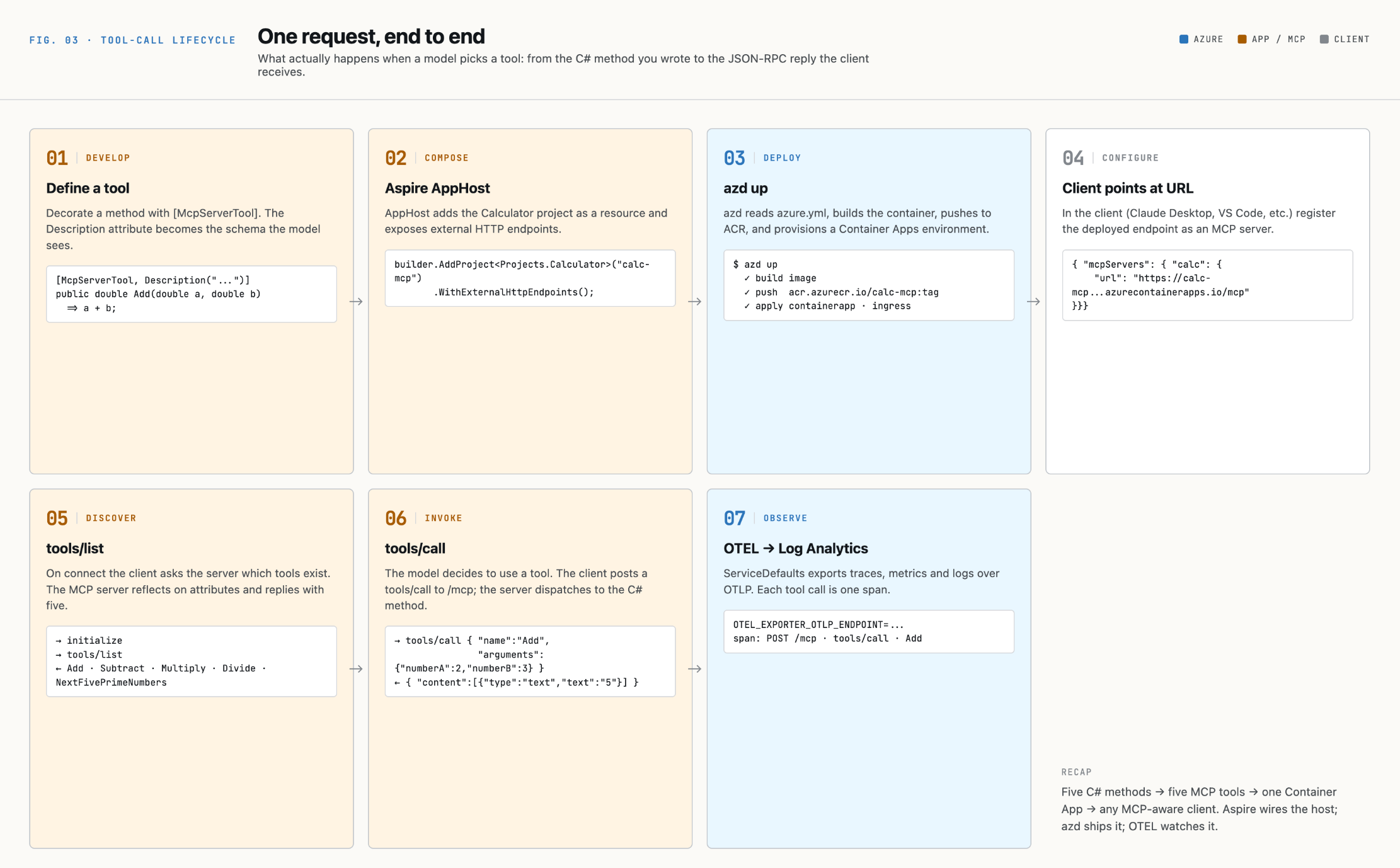
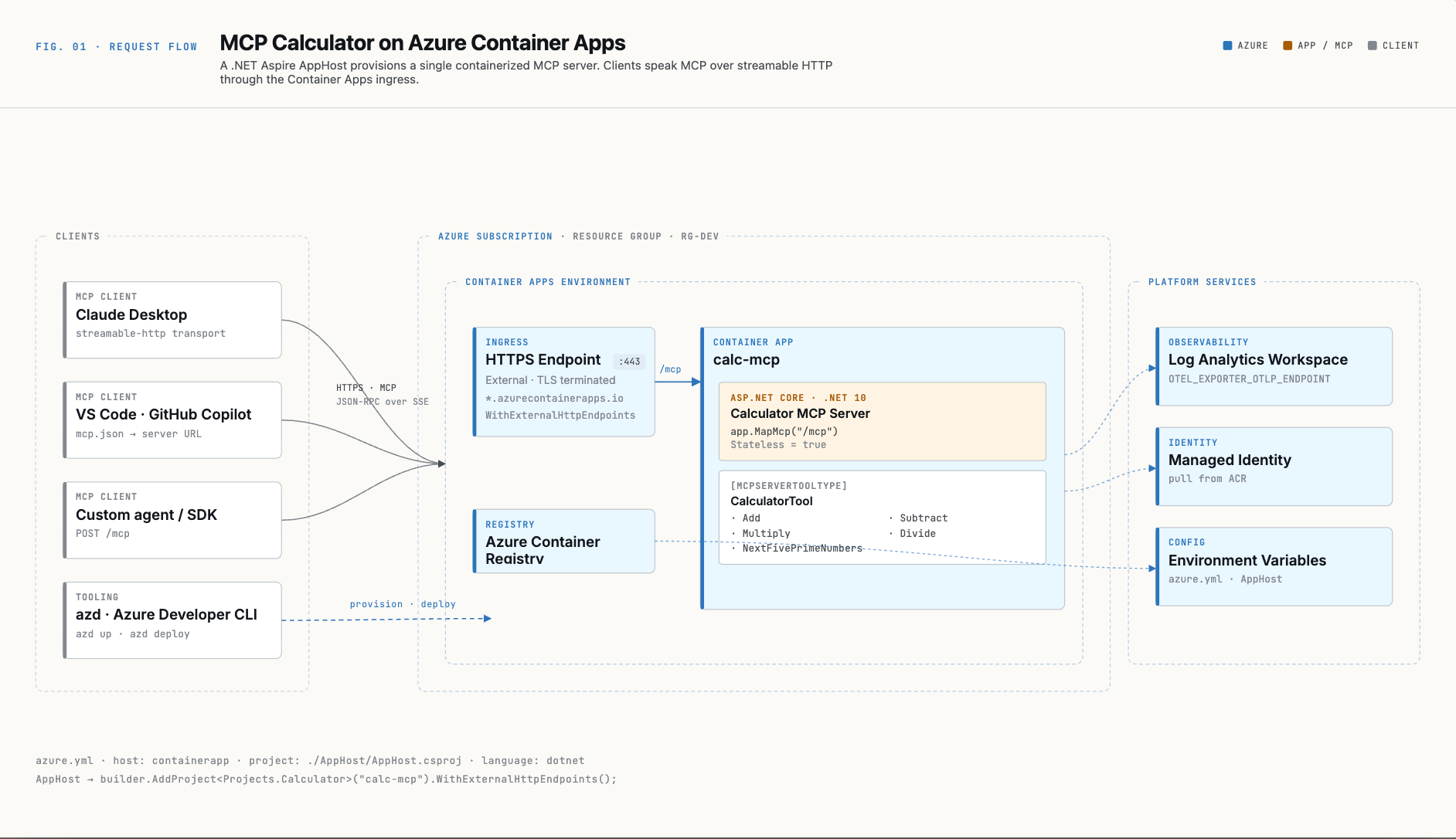
End-to-end horizontal flow
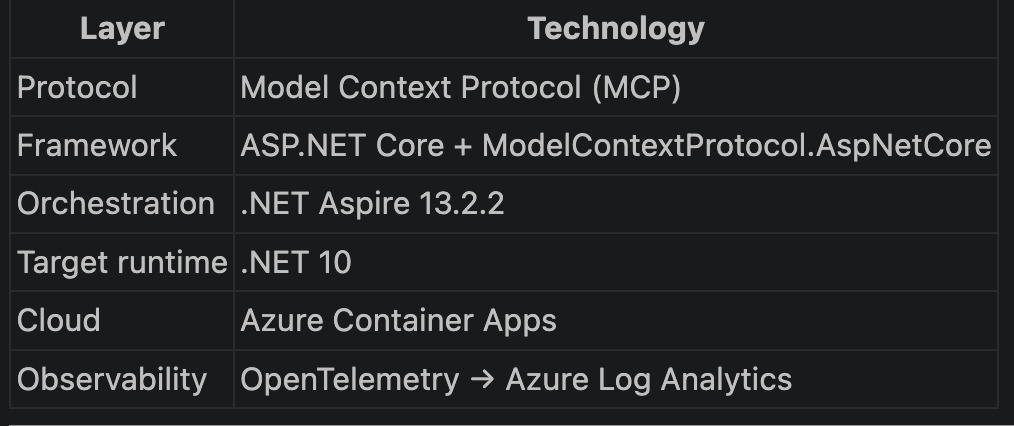
The Stack at a Glance
GITHUB repo for this :
https://github.com/DileepSreepathi/learn-mcp/tree/master/sample-mcp
Project Structure

Three projects, clean separation of concerns. The AppHost never ships to production — it is the development and build-time orchestrator.
What Is MCP?
MCP is a JSON-RPC 2.0 protocol. When an AI model needs to call your tool, it sends a POST request like this:
{
  "jsonrpc": "2.0",
  "id": 1,
  "method": "tools/call",
  "params": {
    "name": "Add",
    "arguments": { "numberA": 5, "numberB": 3 }
  }
}
Your server executes the function and replies:
{
  "jsonrpc": "2.0",
  "id": 1,
  "result": {
    "content": [{ "type": "text", "text": "8" }]
  }
}
Before calling tools, the model issues tools/list to discover what your server exposes and their input schemas. The ModelContextProtocol.AspNetCore library handles all of this wire-level plumbing for you.
Step 1 — Define Your Tools
This is where your business logic lives. The pattern is attribute-driven — decorate a class, decorate each method, done.
check this file path : //Calculator/Tools/CalculatorTool.cs
[McpServerToolType]— tells the framework this class contains tools.[McpServerTool]— marks a method as an MCP-callable tool.[Description("...")]— this text is sent to the LLM as the tool’s description. Write it as you would document a public API.The framework uses reflection to automatically generate the JSON Schema for each tool’s parameters. Your C# types (
double,long,List<long>) become the schema.Throwing an exception from a tool is safe — the framework catches it and returns a structured error to the client.
Step 2 — Wire Up the MCP Server
check this file : //Calculator/Program.csFour things to notice:
AddMcpServer()— registers the MCP protocol handler in the DI container..WithHttpTransport(o => o.Stateless = true)— each HTTP request is fully independent. No session state. This is the right choice for containers and serverless platforms where any replica can serve any request..WithTools<CalculatorTool>()— registers your tool class. The framework discovers all[McpServerTool]methods automatically.app.MapMcp("/mcp")— exposes the MCP endpoint. This single line is where LLMs connect to your server.Step 3 — Shared Infrastructure (ServiceDefaults)
Rather than re-configure OpenTelemetry, health checks, and resilience in every service, Aspire projects use a
ServiceDefaultsshared library. One call,builder.AddServiceDefaults(), applies everything.check this path for the code :
//ServiceDefaults/Extensions.csStructured logs with scopes and formatted messages — great for querying in Azure Log Analytics.
Distributed tracing — every HTTP call (including MCP tool calls) produces a trace span.
Runtime metrics — GC pressure, thread pool, memory.
HTTP resilience by default — any
HttpClientautomatically gets retry logic and a circuit breaker.And the health check endpoints
public static WebApplication MapDefaultEndpoints(this WebApplication app)
{
    if (app.Environment.IsDevelopment())
    {
        app.MapHealthChecks("/health");           // readiness
        app.MapHealthChecks("/alive", new HealthCheckOptions
        {
            Predicate = r => r.Tags.Contains("live")
        });                                        // liveness
    }
    return app;
}
Step 4 — Aspire AppHost (Local Orchestration)
The AppHost is how you run everything locally without docker-compose or manual port juggling.
check here : //AppHost/Program.cs
When you dotnet run the AppHost:
It starts the
Calculatorservice as a child process.It assigns ports and injects connection strings/endpoints as environment variables.
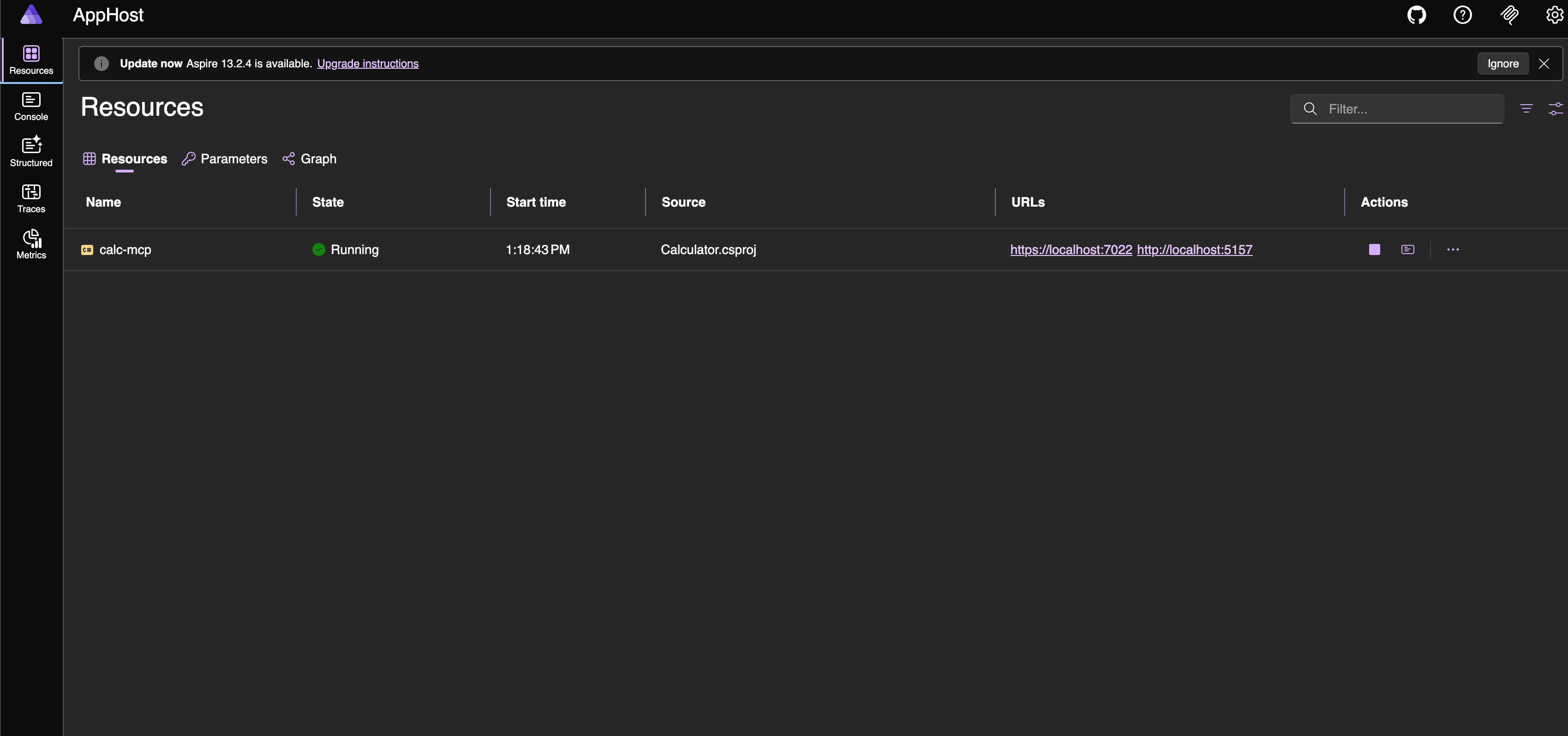
It launches the Aspire Dashboard — a local UI showing logs, traces, and metrics for all services in real time.
WithExternalHttpEndpoints() tells Aspire (and Azure) that the service should be reachable from outside the container environment — not just from other services in the same mesh.
you can see the mcp server is running in the Aspire dashboard.
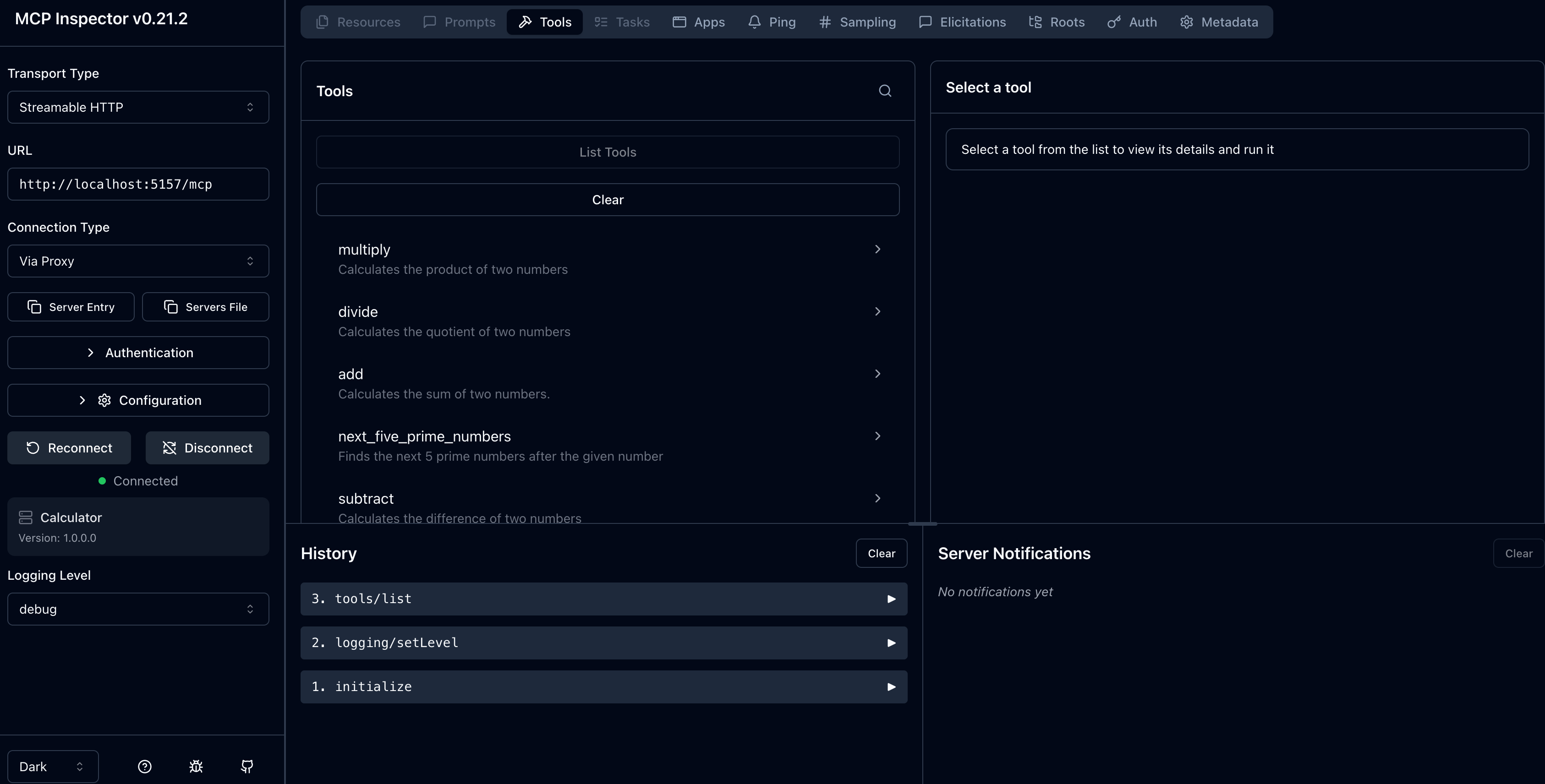
Run this npx @modelcontextprotocol/inspector at the /Calculator path , we connected to the mcp server and tools are listed where we can execute them.
Step 5 — Azure Deployment
The entire Azure deployment is configured in a single file:
# azure.yml
name: mcp-calculator
services:
  app:
    language: dotnet
    project: ./AppHost/AppHost.csproj
    host: containerapp
Run azd up and the Azure Developer CLI:
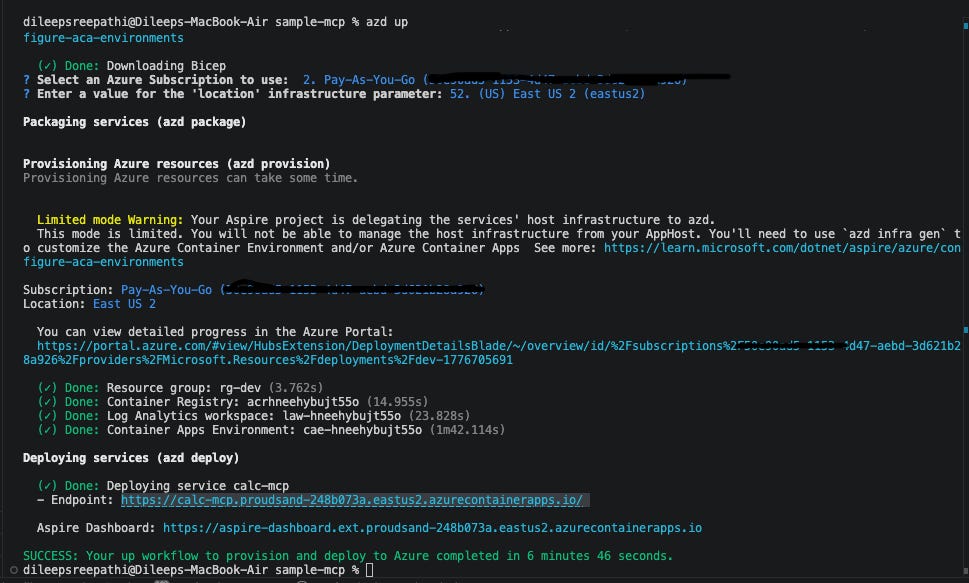
Reads
azure.ymland uses the AppHost as the deployment manifest.Builds a container image from the Calculator project.
Pushes the image to Azure Container Registry (ACR).
Creates a Container Apps Environment with managed HTTPS ingress.
Provisions a Log Analytics Workspace — OpenTelemetry telemetry flows here automatically.
Assigns a Managed Identity — no credentials, no secrets to rotate.
Once all the resources are deployed , you will get the url like :
Your MCP server is live at:
https://calc-mcp.proudsand-248b073a.eastus2.azurecontainerapps.io/mcp
connect the same on the npx inspector to access the tools.
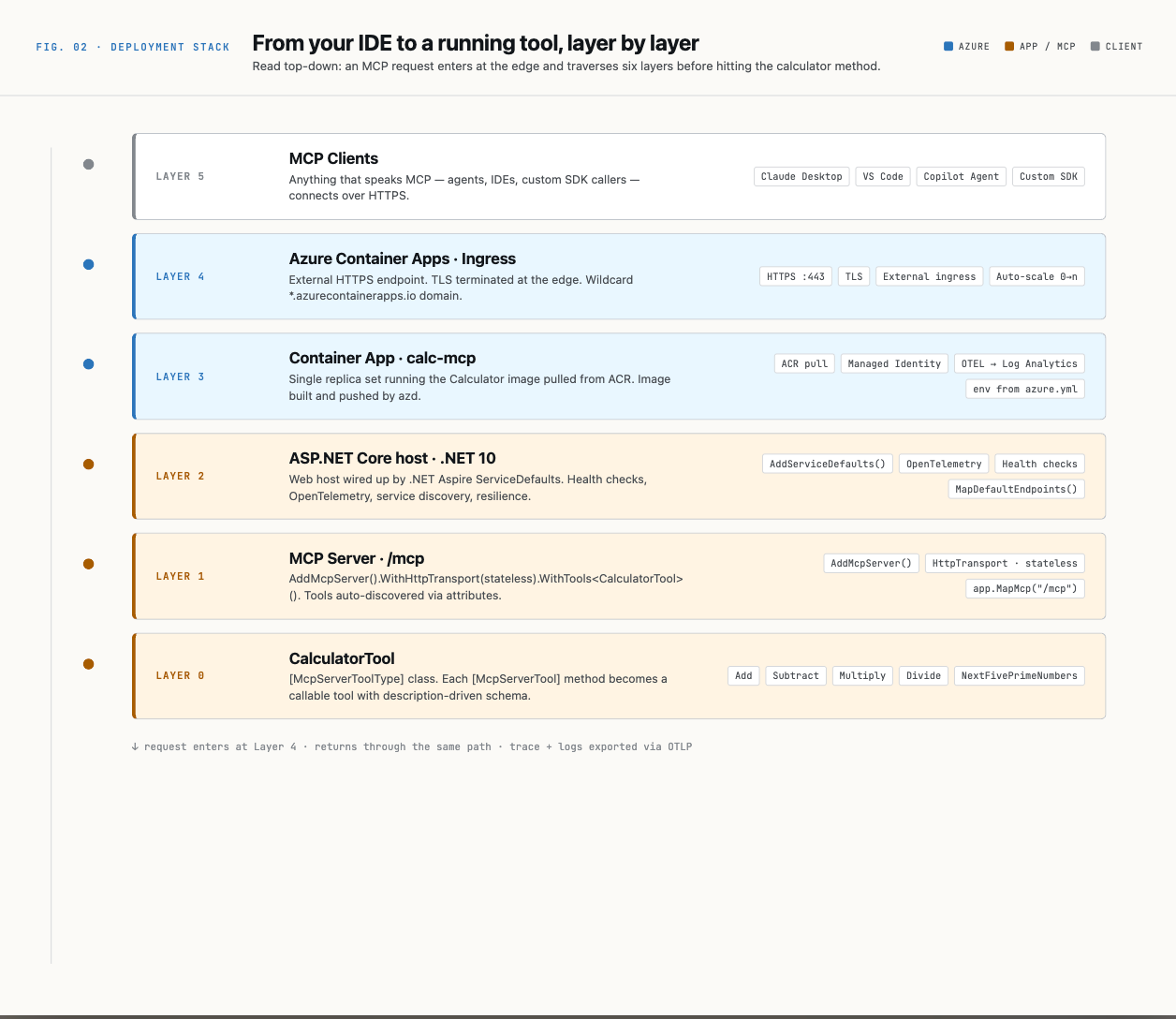
What Makes This Production-Ready
Stateless HTTP transport — any container replica can handle any request. Scale out without sticky sessions.
OpenTelemetry from day one — traces, metrics, and logs flow to Log Analytics without any post-deployment wiring.
Managed Identity — the container accesses ACR and Azure resources using RBAC, not stored secrets.
Health probes — /alive (liveness) and /health (readiness) let the container platform restart unhealthy instances and remove them from rotation during startup.
Zero infrastructure code — Aspire generates the Container Apps configuration from the AppHost. No Bicep files to maintain manually.
The most important insight from this project is how little code you write to expose a meaningful MCP server:
Tool implementation: ~60 lines of pure business logic
MCP wiring: 5 lines in
Program.csAzure deployment: 6 lines of YAML
Everything else — the JSON-RPC protocol handling, JSON Schema generation, container packaging, HTTPS termination, health checks, and distributed tracing — is handled by the framework stack.
This is what the combination of ModelContextProtocol.AspNetCore, .NET Aspire, and azd is designed to do: let you focus on the capabilities you want to expose to AI, and handle the infrastructure plumbing as a solved problem.
Complete Request Life-cycle :