

What is an MCP Client?
An MCP client is the piece of code that connects to an MCP server , asks “what can you do?”, and then calls those capabilities on behalf of your application (or an LLM).
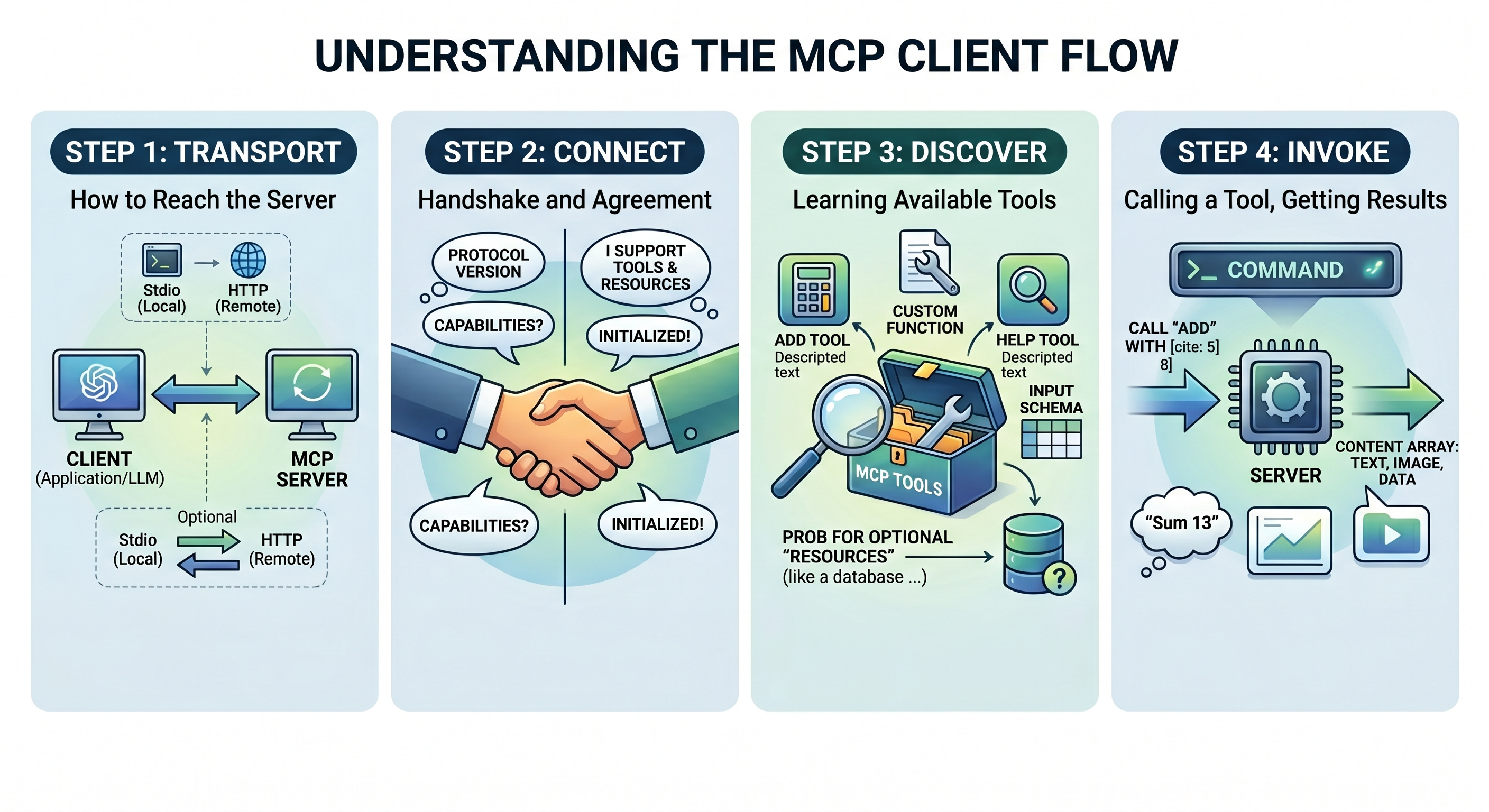
The entire client flow in our demo is four steps:
1. Transport → how to reach the server
2. Connect → handshake and negotiate
3. Discover → list tools (and resources)
4. Invoke → call a tool, get a result
Step 1 — Transport: how to reach the server
var clientTransport = new StdioClientTransport(new()
{
    Name = "Calculator Server",
    Command = "dotnet",
    Arguments = ["run", "--project", ".../McpCalServer.csproj"]
});
The transport answers one question: how do client and server talk?
“StdioClientTransport” means the client spawns the server as a child process and communicates via stdin/stdout. No ports, no network — just two processes piping JSON back and forth.
This is the standard pattern for local MCP servers. For remote servers you’d swap in an HTTP/SSE transport; everything else stays the same.
Step 2 — Connect: handshake and negotiate
await using var mcpClient = await McpClient.CreateAsync(clientTransport);
This single line does three things under the hood:
1. Starts the server process (via the transport)
2. Sends “initialize” — client tells the server its protocol version and capabilities
3. Receives server capabilities — does it support tools? resources? prompts?
After “CreateAsync” returns, both sides know what’s on the table. The await using ensures the connection (and child process) is cleaned up when done.
Step 3 — Discover: list tools and resources
var tools = await mcpClient.ListToolsAsync();
foreach (var tool in tools)
    Console.WriteLine($"  - {tool.Name}: {tool.Description}");
“ListToolsAsync” fires a `tools/list` request. The server responds with each tool’s name, description, and input schema (a JSON Schema object). Nothing is hard-coded — the client learns what exists at runtime.
This is the same data you’d pass to an LLM’s function-calling API. MCP tool schemas are natively compatible with OpenAI, Anthropic, and Gemini tool-use formats.
// Resources are optional — not all servers expose them
try
{
    var resources = await mcpClient.ListResourcesAsync();
}
catch (Exception ex)
{
    Console.WriteLine("No resources available: " + ex.Message);
}
Resources are data sources (files, DB rows, API responses) the server can expose. The `try/catch` isn’t sloppy code — it’s correct MCP behavior. If the server didn’t advertise resources during the handshake, calling `ListResourcesAsync` will throw. The client probes; the server declares he truth.
Step 4 — Invoke: call a tool, get a result
var addResult = await mcpClient.CallToolAsync(
    "add",
    new Dictionary<string, object?> { ["a"] = 5, ["b"] = 8 },
    cancellationToken: CancellationToken.None
);
“CallToolAsync” sends a `tools/call` request with the tool name and its arguments. The server runs the method and returns a content array — a structured result that can contain text, images, or embedded resources.
The `ExtractTextResult` helper in the demo pulls the first text item out of that array. In a real LLM agent you’d pass the whole content array back to the model ae tool result.it is shown in the below complete program.cs code.
Where to take it next:
1. Plug it into an LLM. Pass `tools` straight into `Microsoft.Extensions.AI`’s function-calling pipeline so a model can decide when to call `add` vs `help`.
2. Connect to multiple servers. Create one “McpClient” per server and merge their tool lists — the host doesn’t care where a tool lives.
3. Switch transports. Replace “StdioClientTransport” with an HTTP/SSE transport to talk to a remote MCP server (e.g. one hosted on Azure Container Apps).
4. Add resources and prompts. Extend the server with [McpServerResource] and [McpServerPrompt] to feel the full surface area.
5. Add auth + cancellation. Real clients pass `CancellationToken`s through (we already o) and layer auth on the transport.
complete program.cs code
using Microsoft.Extensions.AI;
using Microsoft.Extensions.Configuration;
using Microsoft.Extensions.Hosting;
using ModelContextProtocol.Client;
using System.Text.Json;


Console.WriteLine("🚀 Starting MCP C# Client...");

try
{
    var builder = Host.CreateApplicationBuilder(args);

        builder.Configuration
        .AddEnvironmentVariables()
        .AddUserSecrets<Program>();

    var clientTransport = new StdioClientTransport(new()
    {
        Name = "Calculator Server",
        Command = "dotnet",
        Arguments = ["run", "--project", "../McpCalServer.csproj"]
    });

     Console.WriteLine("📡 Connecting to MCP server...");

    // Create and connect the MCP client
    await using var mcpClient = await McpClient.CreateAsync(clientTransport);

    Console.WriteLine("✅ Connected to MCP server successfully!");

     // List available tools
    Console.WriteLine("\n📋 Listing available tools:");
    var tools = await mcpClient.ListToolsAsync();
    foreach (var tool in tools)
    {
        Console.WriteLine($"  - {tool.Name}: {tool.Description}");
    }
    // Test calculator operations
    Console.WriteLine("\n🧮 Testing Calculator Operations:");

     // Addition
    var addResult = await mcpClient.CallToolAsync(
        "add",
        new Dictionary<string, object?>() { ["a"] = 5, ["b"] = 8 },
        cancellationToken: CancellationToken.None
    );
    Console.WriteLine($"Add 5 + 8 = {ExtractTextResult(addResult)}");

     // Help
    var helpResult = await mcpClient.CallToolAsync(
        "help",
        new Dictionary<string, object?>(),
        cancellationToken: CancellationToken.None
    );
    Console.WriteLine($"\n📖 Help Information:");
    Console.WriteLine(ExtractTextResult(helpResult));

     // List resources if available
    try
    {
        Console.WriteLine("\n📄 Listing available resources:");
        var resources = await mcpClient.ListResourcesAsync();
        foreach (var resource in resources)
        {
            Console.WriteLine($"  - {resource.Name}: {resource.Description}");
        }
    }
    catch (Exception ex)
    {
        Console.WriteLine("  No resources available or error listing resources: " + ex.Message);
    }

    Console.WriteLine("\n✨ Client operations completed successfully!");
}
catch(Exception ex)
{
     Console.WriteLine($"❌ Error running MCP client: {ex.Message}");
    Console.WriteLine($"Stack trace: {ex.StackTrace}");
}

static string ExtractTextResult(object result)
{
    try
    {
        if (result is IEnumerable<object> contentList)
        {
            foreach (var content in contentList)
            {
                if (content is IDictionary<string, object> contentDict &&
                    contentDict.TryGetValue("text", out var text))
                {
                    return text?.ToString() ?? "No text content";
                }
            }
        }

        // Fallback: try to serialize the entire result
        return JsonSerializer.Serialize(result, new JsonSerializerOptions { WriteIndented = true });
    }
    catch
    {
        return result?.ToString() ?? "No result";
    }
}